Course
Portfolio
2025 Fall Semester
Intro Quiz
Initial assessment covering fundamental concepts in various fields and foundational knowledge evaluation.
Overview
This initial quiz assessed foundational knowledge, covering basic concepts and methodologies required for the course.
📄 Quiz Document
GNU OS Setup
Installation and configuration of GNU operating system, exploring open-source foundations.
Linux Setup Documentation
Complete documentation of the GNU/Linux operating system installation and configuration process.
📄 Setup Documentation
Installation Process
- Downloaded and installed GNU/Linux distribution
- Configured system settings and user accounts
- Installed essential development tools (gcc, make, git)
- Set up command line environment
- Configured package manager and dependencies
Systems Engineering Essay
Comprehensive essay exploring systems engineering principles and methodologies.
What is Engineering?
An exploration of engineering principles, methodologies, and their application in modern technology development.
📄 Essay Document
Artistic Approach to Engineering
An interactive visual presentation exploring the creative and systematic aspects of engineering through an engaging multimedia experience.
This interactive presentation demonstrates how engineering concepts can be communicated through creative visual design, combining technical accuracy with artistic expression.
Computer Architecture
In-depth analysis of computer architecture fundamentals and hardware design principles.
Computer Architecture Analysis
Detailed study of computer architecture components, CPU design, memory hierarchy, and system organization.
📄 Architecture Essay
Artistic Approach to Computer Architecture
An educational video demonstrating computer architecture concepts through the Little Man Computer (LMC) model, making complex computational processes accessible and visual.
This video uses the Little Man Computer model to visualize how a CPU fetches, decodes, and executes instructions, making abstract architecture concepts tangible and understandable.
OS Architecture Essay
Detailed exploration of operating system architecture and kernel design.
Operating System Architecture
Comprehensive analysis of OS architectures, kernel designs, and system-level programming concepts.
📄 OS Architecture Essay
Creative Approach to Operating System Architecture
A visual story map illustrating the structure and components of operating system architecture, making complex system interactions understandable through creative visualization.
🗺️ Operating System Architecture Story Map
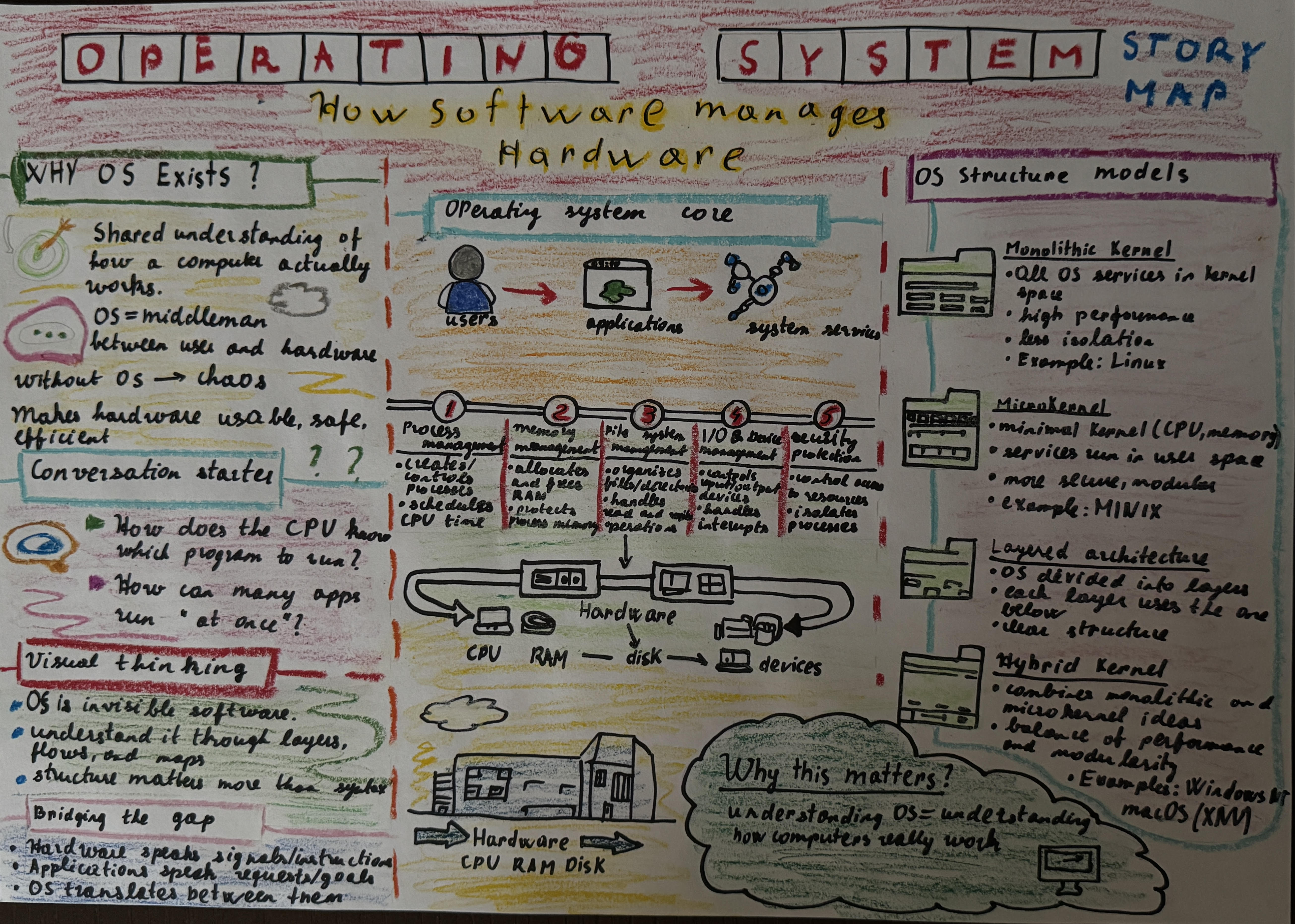
This story map visualizes the relationships between OS components, kernel layers, and system processes, transforming technical documentation into an engaging narrative flow.
Industry Matrix
Comparative analysis of industry practices and technology landscape evaluation.
Industry Analysis Matrix
Comparative study of different technology sectors, their practices, and emerging trends in the industry.
📄 Industry Matrix Document
RosettaCode Programming
Algorithm implementations across multiple programming languages and paradigms.
Programming Language Implementations
Collection of algorithms and programs implemented in multiple programming languages.
📂 Lisp - Math Console
(defun factorial (n)
  (if (<= n 1) 1 (* n (factorial (- n 1)))))

(defun fibonacci (n)
  (if (<= n 1) n (+ (fibonacci (- n 1)) (fibonacci (- n 2)))))

(defun power (x n)
  (if (= n 0) 1 (* x (power x (- n 1)))))

(defun math-console ()
  (format t "Welcome to the Lisp Math Console!~%")
  (loop
    (format t "~%Options:~%1) Factorial~%2) Fibonacci~%3) Power~%4) Exit~%")
    (let ((choice (read-int "Enter your choice (1-4): ")))
      (case choice
        (1 (let ((n (read-int "Enter number for factorial: ")))
             (format t "Factorial of ~a = ~a~%" n (factorial n))))
        (2 (let ((n (read-int "Enter number for Fibonacci: ")))
             (format t "Fibonacci of ~a = ~a~%" n (fibonacci n))))
        (3 (let ((x (read-number "Enter the base: "))
                 (n (read-int "Enter the exponent: ")))
             (format t "~a^~a = ~a~%" x n (power x n))))
(4 (format t "Exiting Math Console. Goodbye!~%") (return))))))📂 Python - Number Analyzer
def is_prime(n):
    if n < 2:
        return False
    for i in range(2, int(n**0.5)+1):
        if n % i == 0:
            return False
    return True

def is_perfect(n):
    return sum(i for i in range(1, n) if n % i == 0) == n

def sum_of_digits(n):
    return sum(int(d) for d in str(abs(n)))

def magic_number_analyzer():
    print(" Welcome to the Magic Number Analyzer! ")
    while True:
        try:
            num_input = input("\nEnter an integer (or 'exit' to quit): ")
            if num_input.lower() == 'exit':
                print("Goodbye! Keep exploring numbers!")
                break
            n = int(num_input)
        except ValueError:
            print("Please enter a valid integer.")
            continue

        print(f"\nAnalyzing {n}...")
        print("- Prime? ", "Yes ✅" if is_prime(n) else "No ❌")
        print("- Perfect? ", "Yes ✅" if is_perfect(n) else "No ❌")
print("- Sum of digits: ", sum_of_digits(n))📂 Tcl - Pascal's Triangle
#!/usr/bin/env tclsh

proc factorial {n} {
    set f 1
    for {set i 1} {$i <= $n} {incr i} {
        set f [expr {$f * $i}]
    }
    return $f
}

proc combination {n r} {
    return [expr { [factorial $n] / ([factorial $r] * [factorial [expr {$n - $r}]] ) }]
}

proc pascal_triangle {rows} {
    for {set i 0} {$i < $rows} {incr i} {
        for {set s 0} {$s < [expr {$rows - $i - 1}]} {incr s} {
            puts -nonewline " "
        }
        for {set j 0} {$j <= $i} {incr j} {
            puts -nonewline "[combination $i $j] "
        }
        puts ""
    }
}📂 Lua - Prime Finder (Sieve of Eratosthenes)
io.write("Enter the limit: ")
local n = tonumber(io.read())
local sieve = {}
for i=2,n do sieve[i]=true end
for i=2, math.floor(math.sqrt(n)) do
    if sieve[i] then
        for j=i*i,n,i do
            sieve[j] = false
        end
    end
end
print("Primes up to "..n..":")
for i=2,n do
    if sieve[i] then io.write(i.." ") end
end
print()📂 Java - Quadratic Solver
import java.util.Scanner;

public class QuadraticSolver {
    public static void main(String[] args) {
        Scanner sc = new Scanner(System.in);
        System.out.print("Enter a b c: ");
        double a = sc.nextDouble();
        double b = sc.nextDouble();
        double c = sc.nextDouble();
        double d = b*b - 4*a*c;
        if(d > 0) {
            double r1 = (-b + Math.sqrt(d))/(2*a);
            double r2 = (-b - Math.sqrt(d))/(2*a);
            System.out.println("Two real roots: " + r1 + ", " + r2);
        } else if(d==0) {
            System.out.println("One real root: " + (-b/(2*a)));
        } else {
            double real = -b/(2*a);
            double imag = Math.sqrt(-d)/(2*a);
            System.out.println("Two complex roots: " + real + " + " + imag + "i");
        }
    }
}📂 C++ - Simple Calculator with Memory
#include <iostream>
#include <map>
using namespace std;

int main() {
    double result = 0;
    map<string,double> memory;
    cout << "Simple Calculator (+ - * / %) with memory slots M1, M2...\n";

    while(true) {
        cout << "> ";
        string cmd;
        getline(cin, cmd);
        if(cmd=="exit") break;

        if(cmd.substr(0,5)=="store") {
            string slot = cmd.substr(6);
            memory[slot] = result;
            cout << "Stored " << result << " in " << slot << "\n";
            continue;
        }

        double a, b;
        char op;
        if(sscanf(cmd.c_str(), "%lf %c %lf", &a, &op, &b)==3) {
            switch(op) {
                case '+': result = a+b; break;
                case '-': result = a-b; break;
                case '*': result = a*b; break;
                case '/': result = (b!=0)? a/b : 0; break;
            }
            cout << "Result: " << result << "\n";
        }
    }
    return 0;
}Assignment Status Report
Comprehensive tracking and evaluation of all completed assignments throughout the semester.
Assignment Status Overview
Detailed tracking of all course assignments, completion status, and progress evaluation.
📄 Status Report Document
Demoscenes
Creative technical projects showcasing programming skills, graphics, and artistic expression through code.
Demoscene Project Collection
A collection of creative coding projects demonstrating technical skills in graphics programming, animation, and real-time rendering across multiple languages.
🎪 Covering Rulebook Requirements
📂 Animated Polar Rose (Lua/LÖVE)
Beautiful animated polar rose patterns with multiple layers and color cycling.
local t=0; local cx,cy=320,240; local speed=2
local scale={300,200,120}; local k={5,7,3}

function love.load()
    love.window.setMode(640,480)
    love.graphics.setBackgroundColor(0,0,0)
end

function love.update(dt)
    t=t+dt*speed
end

function love.draw()
    for l=1,3 do
        for theta=0,math.pi*8,0.01 do
            local r=scale[l]*math.cos(k[l]*theta+t*l*0.5)
            local x=cx+r*math.cos(theta)
            local y=cy+r*math.sin(theta)
            local c=math.floor(theta*50+t*50*l)%256
            love.graphics.setColor(c/255,((c*2)%256)/255,(c*3)%256/255,1)
            love.graphics.points(x,y)
        end
    end
end📂 Julia Set Animation (Lua/LÖVE with Shaders)
Real-time animated Julia set fractal using GPU shaders with interactive controls.
📂 Concentric Circles with Waves (C++/SDL2)
Animated concentric circles with wave effects using SDL2.
📂 Mandala Art Plate (Java/Swing)
Interactive mandala generator with layers, symmetry, and animated elements.
📂 Mandelbrot Set (Tcl/Tk)
📂 Procedural Color Pattern (Smalltalk)
📂 Sierpinski Triangle (Python/Tkinter)
📂 Spiral with Color Cycling (Python/Pygame)
🎬 Initial Demo Set
📂 Additional Demos
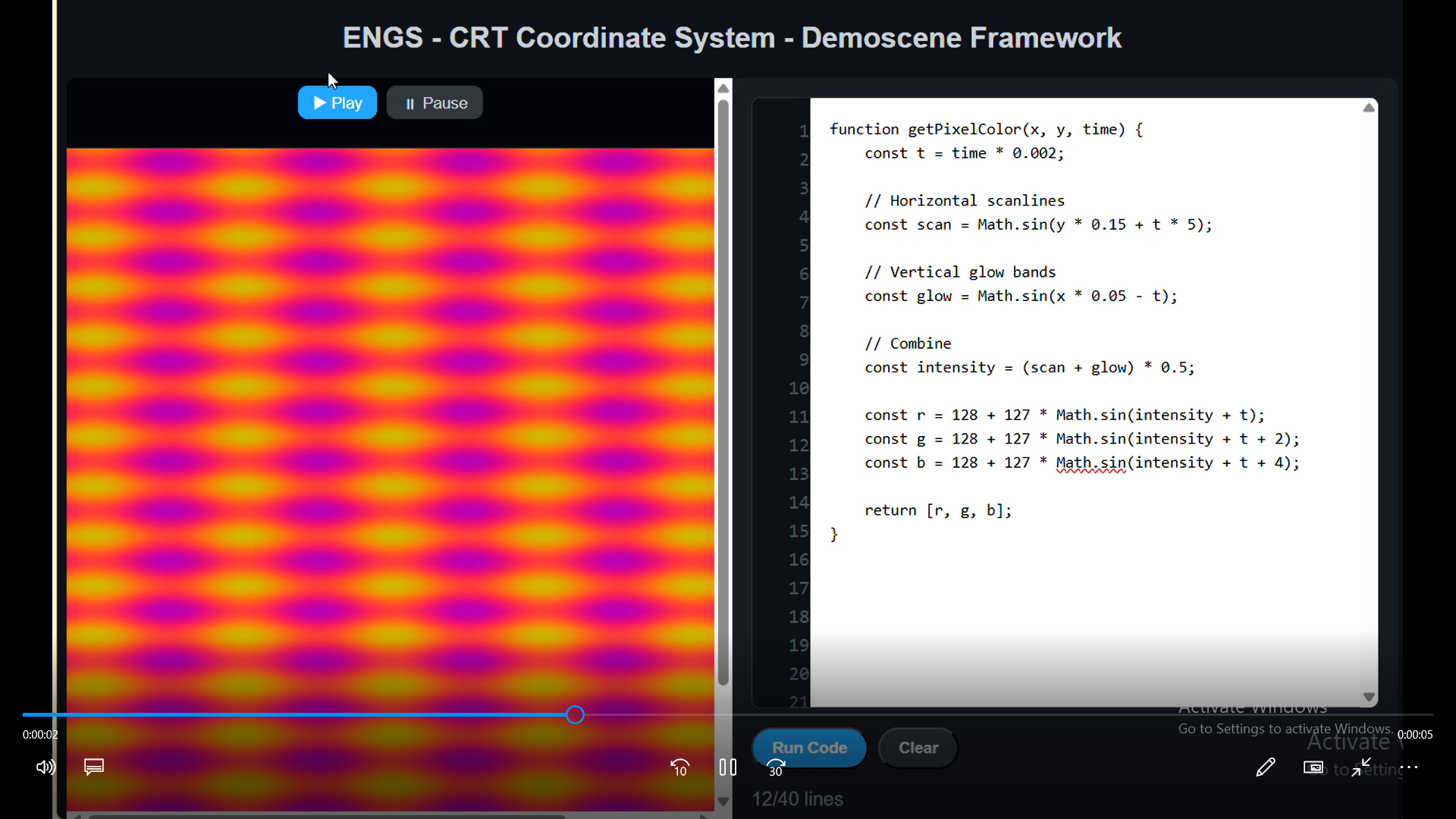
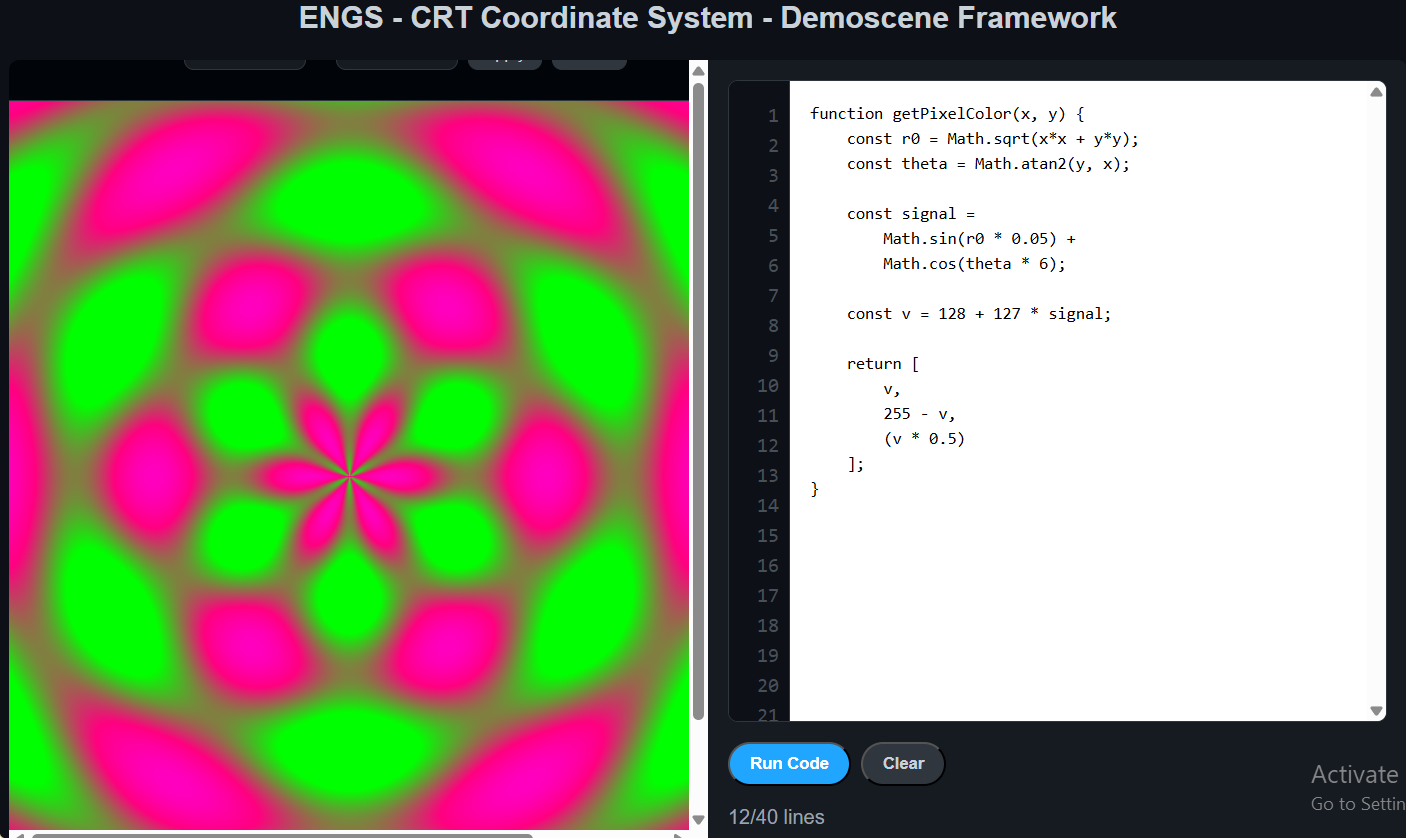
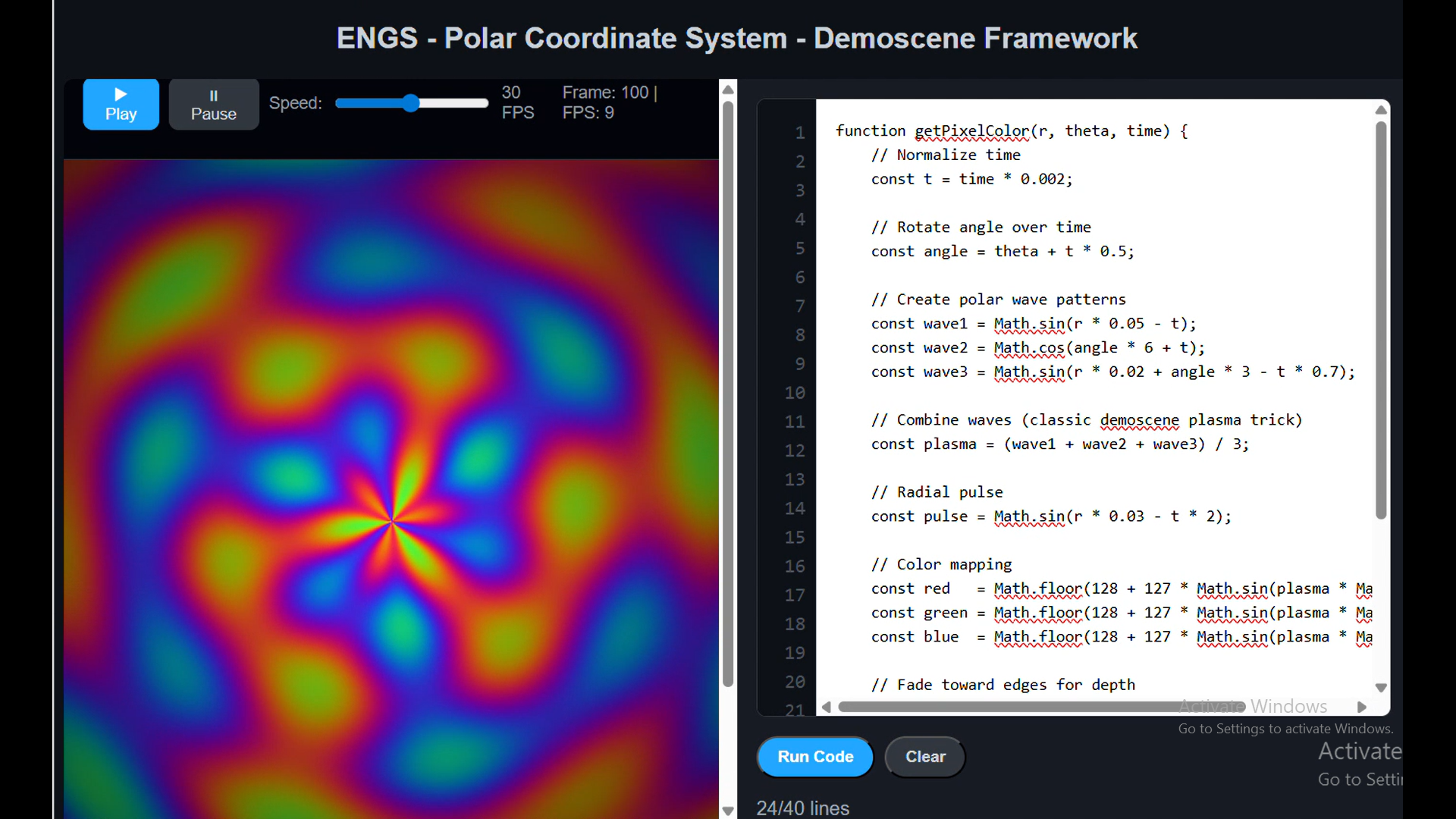
ENGS - CRT Coordinate System Demo
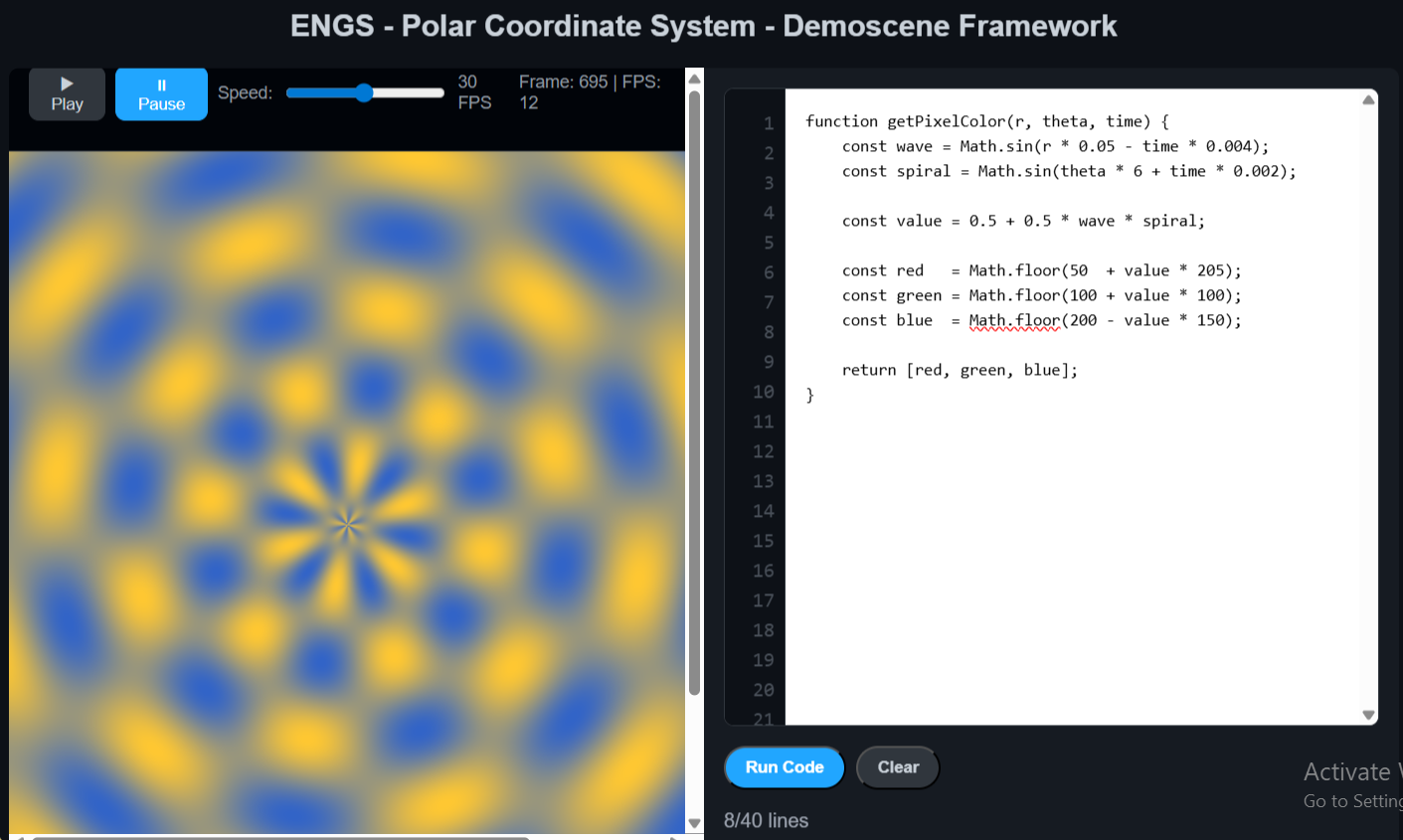
ENGS - Polar Animation Demo
Game of Life Variations
Creative implementations of Conway's Game of Life with unique visual effects and extensions.
Game of Life Project Collection
Multiple creative implementations of Conway's Game of Life cellular automaton with various visual effects, 3D projections, and interactive features.
📂 Aurora Life (Java/Swing)
Beautiful Game of Life implementation with energy-based color fading and aurora-like visual effects.
📂 Creative Life with Sound (Python/Pygame)
Game of Life with dynamic sound generation that responds to cell patterns.
📂 Colorful Particles Life (Tcl/Tk)
Game of Life with colorful particle effects and interactive controls.
📂 Life on Sphere (C++/SDL2)
Game of Life projected onto a rotating 3D sphere with perspective rendering.
📂 Terminal Flickering Life (Ruby)
Terminal-based Game of Life with gravity effects and colorized output.
📂 Falling Cells Life (Lua/LÖVE)
Game of Life with gravity - cells fall downward creating unique patterns.
Midterm Evaluation
Critical self-assessment of midterm performance and academic progression.
Midterm Self-Evaluation
Comprehensive reflection on learning outcomes, challenges faced, and progress made during the first half of the semester.
📄 Midterm Evaluation Document
Diaspora Account
Social network setup and configuration in decentralized platforms.
Diaspora Social Network Setup
Configuration and exploration of the Diaspora decentralized social network platform.
📄 Diaspora Account Documentation
Account Information
Diaspora Handle: @arakelyan_anahit
Assignments Summary
Comprehensive overview and summary of all completed coursework.
Complete Assignments Summary
Comprehensive summary document covering all assignments completed throughout the semester with reflections and outcomes.
📄 Assignments Summary Document
QUCS/TKGate Circuit Design
Digital logic circuit design and simulation using QUCS and TKGate tools.
Digital Circuit Implementations
Collection of fundamental digital logic circuits designed and simulated using QUCS and TKGate software, demonstrating understanding of basic logic gates and flip-flop circuits.
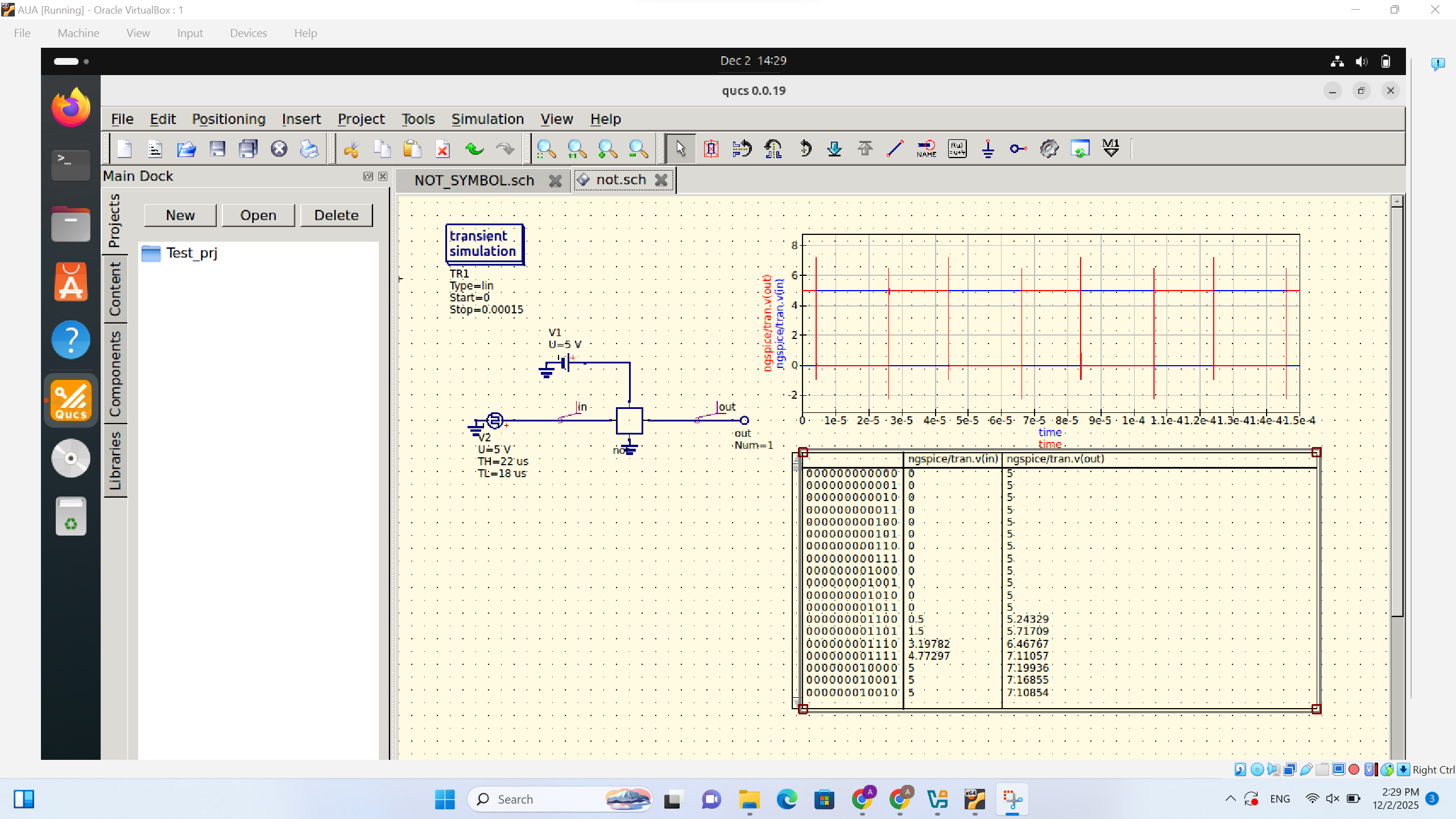
🔌 NOT Gate
Basic inverter circuit implementation demonstrating logic negation.
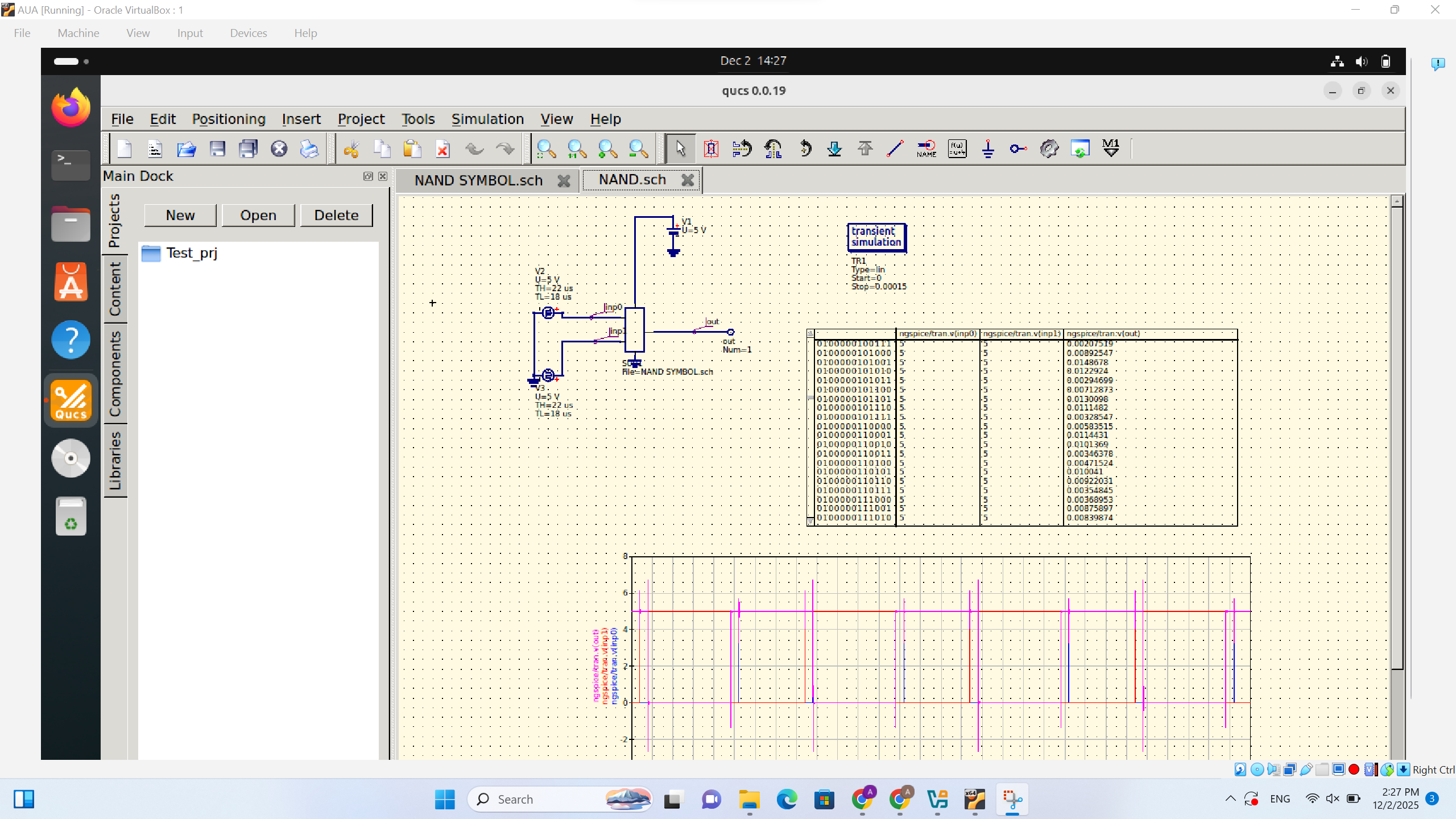
🔌 NAND Gate
Universal logic gate implementation showing NAND functionality.
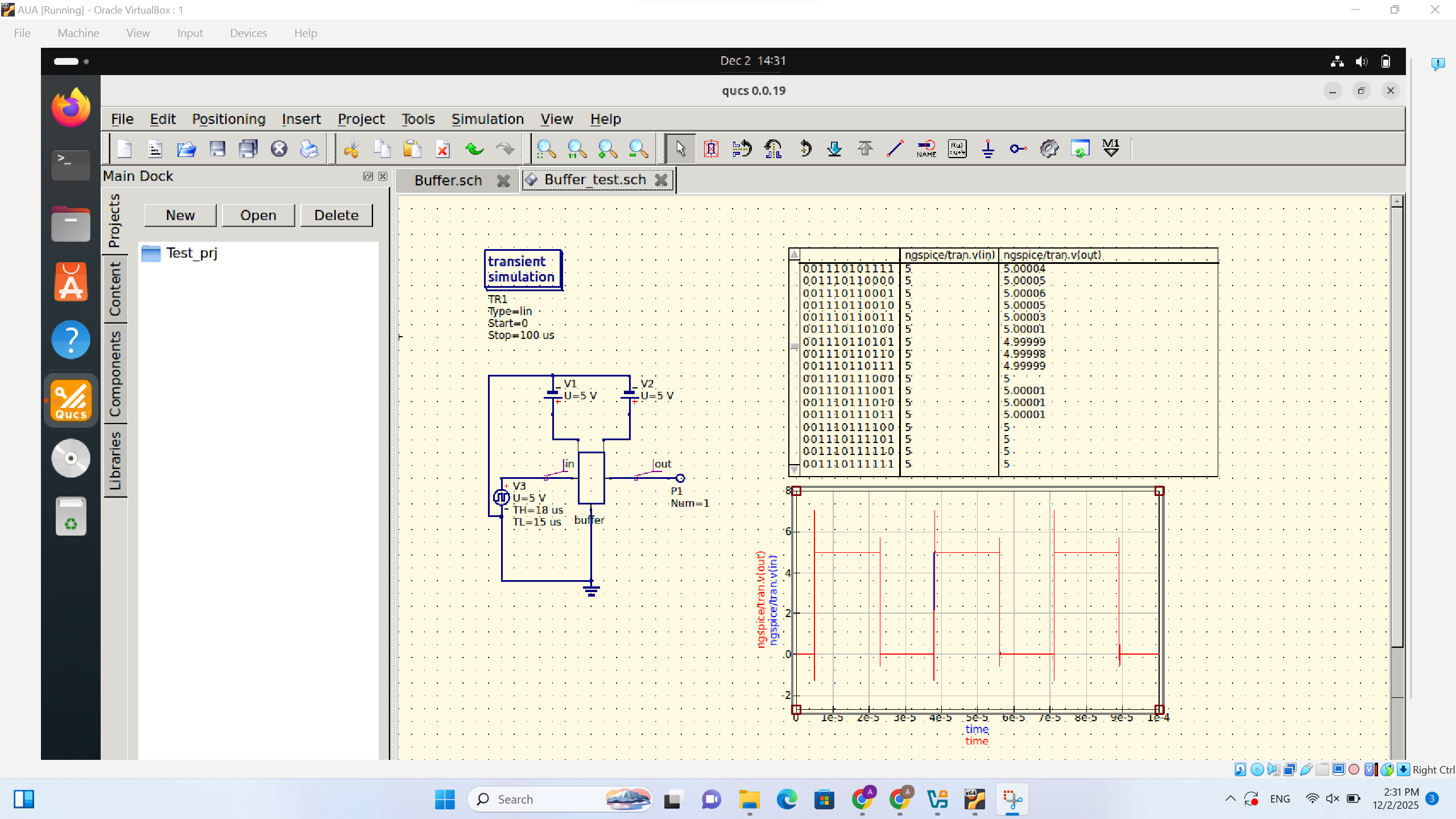
🔌 Buffer Circuit
Signal buffer implementation for signal amplification and isolation.
🔌 D Flip-Flop
Sequential logic circuit demonstrating data storage and clock-synchronized operation.
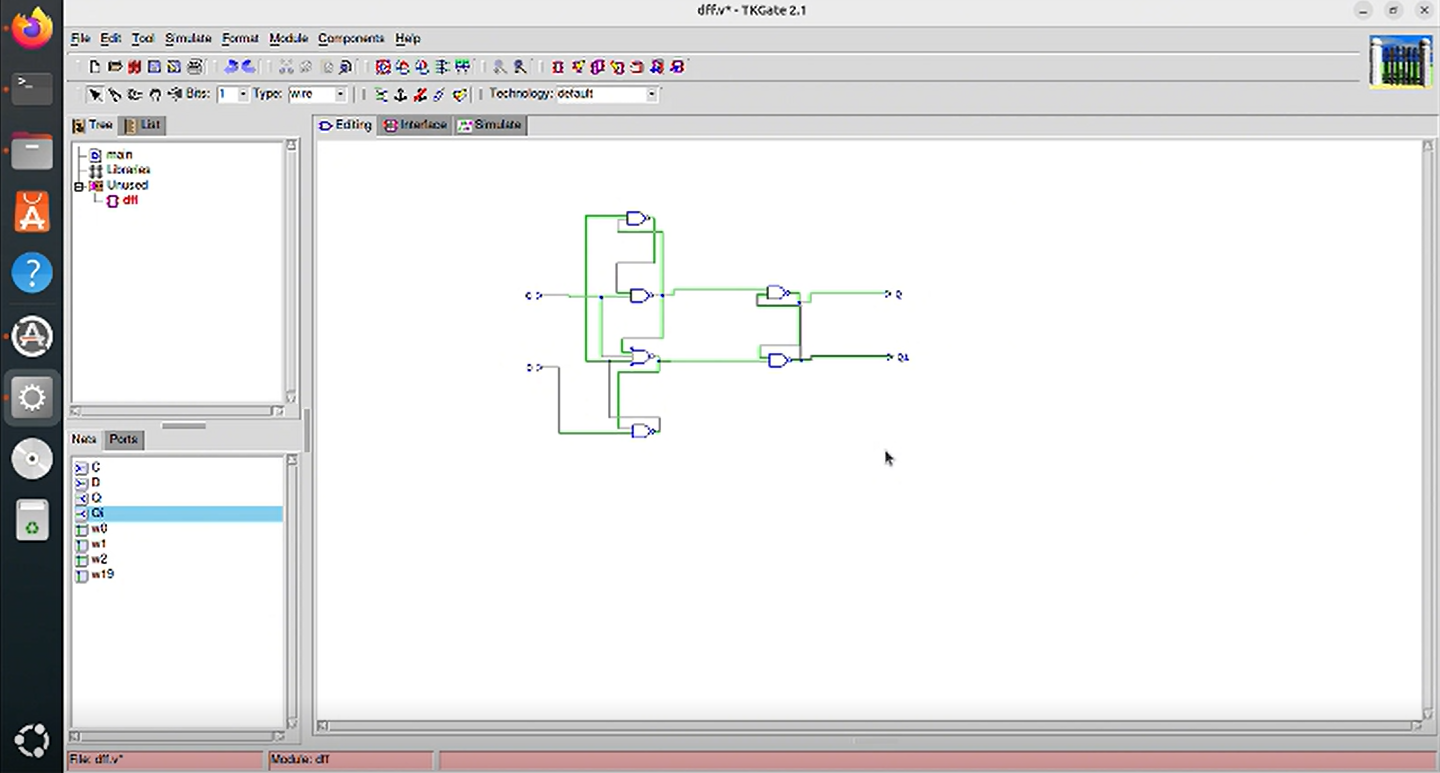
🔌 SR Latch
Implementation of an SR (Set–Reset) Latch using TKGate, demonstrating basic memory behavior and state control in sequential logic circuits.
In this video, I explain how an SR latch is built in TKGate and how its set and reset inputs control the output state.
Tools Used
- QUCS – Quite Universal Circuit Simulator for analog and digital circuit simulation
- TKGate – Digital logic circuit design and simulation tool
Project – XMPP
XMPP (Jabber) instant messaging protocol implementation and user account management.
XMPP Communication System
Implementation and configuration of XMPP (Extensible Messaging and Presence Protocol), also known as Jabber, for real-time communication.
My Role: User Account Management
I created and configured XMPP user accounts, set usernames, managed authentication credentials, and verified successful login.
This video demonstrates the XMPP interface and shows how user accounts were created.
Project – Diaspora Interface
This assignment demonstrates the Diaspora interface. In the video, the interface and its functionality are explained in detail.
Diaspora Interface Overview
This project explores the Diaspora social network interface, explaining navigation, main features, and user interactions.
The video explains the interface step by step.