#!/usr/bin/env python3
"""
term_compiler.py (Version 7.1 - Final Polished Version)

A terminal-based Python editor for demoscenes. This script provides a
split-screen Curses interface for writing and running Python code, with
special features for creating graphical demoscenes.

- This version fixes a UI issue where the F2 line limit was not displayed
  in the main header and corrects the F3 Math Mode status message.
"""

# =============================================================================
# --- 1. IMPORTS AND GLOBAL CONFIGURATION ---
# =============================================================================
import curses
import tempfile
import subprocess
import os
import sys
import threading
import venv
import ast
import importlib.util
import shutil
from typing import List, Optional, IO, Set, Callable, Tuple

# --- Constants ---
VENV_DIR = ".demo_venv"
PRESET_LIMITS = [12, 40, 300]  # {Lines Limit}

PACKAGE_MAP = {
    "cv2": "opencv-python", "PIL": "Pillow", "skimage": "scikit-image",
    "sklearn": "scikit-learn", "bs4": "beautifulsoup4", "pygame": "pygame",
    "numpy": "numpy", "rich": "rich", "kivy": "kivy", "urwid": "urwid",
    "PySide6": "PySide6", "pyglet": "pyglet", "PyQt5": "PyQt5", "flet": "flet",
    "textual": "textual"
}


# =============================================================================
# --- 2. CORE TEMPLATES ---
# =============================================================================

# {Math Mode} Template for the graphical tkinter canvas.
GRAPHICAL_CANVAS_TEMPLATE = """
import tkinter as tk
import time
import math
import numpy as np
import random

WIDTH, HEIGHT = 400, 300
PIXEL_SIZE = 2
WIN_WIDTH, WIN_HEIGHT = WIDTH * PIXEL_SIZE, HEIGHT * PIXEL_SIZE
t = 0.0

try:
    window = tk.Tk()
    window.title("Math Mode Canvas")
    window.geometry(f"{WIN_WIDTH}x{WIN_HEIGHT}")
    canvas = tk.Canvas(window, width=WIN_WIDTH, height=WIN_HEIGHT, bg="black")
    canvas.pack()

    image = tk.PhotoImage(width=WIN_WIDTH, height=WIN_HEIGHT)
    canvas.create_image((0, 0), image=image, anchor="nw")

    def rgb_to_hex(r, g, b):
        return f"#{int(r)&0xff:02x}{int(g)&0xff:02x}{int(b)&0xff:02x}"

    def update_frame():
        global t
        pixel_data = []
        for y in range(HEIGHT):
            row_data = []
            for x in range(WIDTH):
                # --- INJECTED SHADER CODE ---
                __SHADER_CODE_HERE__
                # --- END INJECTED CODE ---
                r, g, b = locals().get('r', 0), locals().get('g', 0), locals().get('b', 0)
                r, g, b = max(0, min(255, r)), max(0, min(255, g)), max(0, min(255, b))
                hex_color = rgb_to_hex(r, g, b)
                row_data.extend([hex_color] * PIXEL_SIZE)
            for _ in range(PIXEL_SIZE):
                pixel_data.append("{" + " ".join(row_data) + "}")

        image.put(" ".join(pixel_data))
        t += 0.03
        window.after(16, update_frame)

    window.after(0, update_frame)
    window.mainloop()
except tk.TclError as e:
    print(f"--- GRAPHICS ERROR: Could not initialize canvas. ---")
    print(f"--- Details: {e} ---")
    input("\\nPress Enter to return...")
except Exception as e:
    print(f"\\n--- SHADER ERROR ---\\n{e}")
    try: print(f"Occurred at x={x}, y={y}, t={t}")
    except NameError: print("Error occurred before animation loop.")
    input("\\nPress Enter to return...")
"""


# =============================================================================
# --- 3. GLOBAL STATE MANAGEMENT ---
# =============================================================================
demo_proc: Optional[subprocess.Popen] = None
output_lines: List[str] = ["Welcome! Dependencies will be auto-installed on run."]
VENV_PYTHON = ""


# =============================================================================
# --- 4. VIRTUAL ENVIRONMENT & DEPENDENCY MANAGEMENT ---
# =============================================================================

def setup_venv():
    """Checks for, creates, and validates the Python virtual environment."""
    global VENV_PYTHON
    scripts_dir = "Scripts" if sys.platform == "win32" else "bin"
    VENV_PYTHON = os.path.join(VENV_DIR, scripts_dir, "python")
    try:
        if not os.path.exists(VENV_PYTHON) or subprocess.run([VENV_PYTHON, "--version"], check=True, capture_output=True).returncode != 0:
            raise FileNotFoundError
    except (subprocess.CalledProcessError, FileNotFoundError):
        print(f"--- Creating virtual environment in ./{VENV_DIR} ---")
        shutil.rmtree(VENV_DIR, ignore_errors=True)
        try:
            venv.create(VENV_DIR, with_pip=True)
            subprocess.run([VENV_PYTHON, "-m", "pip", "install", "--upgrade", "pip"], check=True, capture_output=True)
            print("--- Setup complete. ---")
        except Exception as e:
            print(f"\n--- VENV CREATION FAILED: {e} ---")
            VENV_PYTHON = sys.executable
            input("--- Falling back to system Python. Press Enter. ---")

def install_dependencies(lines: List[str], log_func: Callable[[str], None]):
    """Parses code for imports and auto-installs missing packages."""
    # {Automatic Dependency Installation}
    if VENV_PYTHON == sys.executable: return
    try:
        tree = ast.parse("\n".join(lines))
        imports = {node.names[0].name.split('.')[0] for node in ast.walk(tree) if isinstance(node, ast.Import)}
        imports.update({node.module.split('.')[0] for node in ast.walk(tree) if isinstance(node, ast.ImportFrom) and node.module})
    except SyntaxError: return

    if not imports: return
    log_func("--- Checking dependencies... ---")
    result = subprocess.run([VENV_PYTHON, "-m", "pip", "freeze"], capture_output=True, text=True)
    installed = {p.split('==')[0].lower() for p in result.stdout.splitlines()}

    for imp in imports:
        spec = importlib.util.find_spec(imp)
        is_std_lib = spec and "site-packages" not in (spec.origin or "") and "dist-packages" not in (spec.origin or "")
        package_name = PACKAGE_MAP.get(imp, imp)
        if not is_std_lib and package_name and package_name.lower() not in installed:
            log_func(f"--- Installing: {package_name} ---")
            try:
                subprocess.run([VENV_PYTHON, "-m", "pip", "install", package_name], check=True, capture_output=True, text=True)
                log_func(f"--- Installed {package_name} successfully. ---")
            except subprocess.CalledProcessError:
                log_func(f"--- FAILED to install {package_name}. ---")


# =============================================================================
# --- 5. PROCESS EXECUTION AND MANAGEMENT ---
# =============================================================================

def stop_running_demo():
    """Safely terminates any running background demo process."""
    global demo_proc
    if demo_proc and demo_proc.poll() is None:
        try:
            demo_proc.terminate()
            demo_proc.wait(timeout=0.5)
        except subprocess.TimeoutExpired:
            demo_proc.kill()
        except Exception: pass
    demo_proc = None

def run_code(lines: List[str], in_background: bool) -> Tuple[bool, str]:
    """Executes user code, either in the background or foreground."""
    global demo_proc
    stop_running_demo()
    install_dependencies(lines, log_func=output_lines.append if in_background else print)

    temp_path = ""
    try:
        with tempfile.NamedTemporaryFile(mode="w", suffix=".py", delete=False, encoding="utf-8") as tf:
            tf.write("\n".join(lines)); temp_path = tf.name

        if in_background:
            # {Background Run}
            output_lines.append("--- LAUNCHING BACKGROUND DEMO ---")
            demo_proc = subprocess.Popen([VENV_PYTHON, temp_path], stdout=subprocess.PIPE, stderr=subprocess.STDOUT, text=True, encoding='utf-8')
            def read_output(pipe: IO):
                for line in iter(pipe.readline, ''):
                    if len(output_lines) > 200: output_lines.pop(0)
                    output_lines.append(line.strip())
            threading.Thread(target=read_output, args=(demo_proc.stdout,), daemon=True).start()
        else:
            # {Terminal Run}
            print("--- LAUNCHING DEMO (Close window or press Ctrl+C to stop) ---")
            try:
                subprocess.run([VENV_PYTHON, temp_path], check=False)
            except KeyboardInterrupt:
                print("\n--- DEMO INTERRUPTED BY USER ---")

            # {Robust Interrupt Handling}
            print("--- Press Enter to return to the editor ---")
            try:
                input()
            except KeyboardInterrupt:
                print("\n--- Returning to editor. ---")

        return True, "Launched."
    except Exception as e:
        msg = f"--- FAILED TO LAUNCH: {e} ---"
        (output_lines.append if in_background else print)(msg)
        return False, "Launch failed."
    finally:
        if temp_path:
            threading.Timer(1.0, lambda p=temp_path: os.unlink(p) if os.path.exists(p) else None).start()


# =============================================================================
# --- 6. MAIN CURSES EDITOR UI & LOGIC ---
# =============================================================================

def draw_panes(stdscr, state: dict):
    """Draws the entire editor UI."""
    # {UI}
    h, w = stdscr.getmaxyx()
    if h < 5 or w < 20:
        stdscr.addstr(0, 0, "Terminal too small."); return

    editor_w, content_h = w // 2, h - 3

    # --- Draw Header --- {FIXED}
    header = "Ctrl+R=BG Run|Ctrl+T=Run|Ctrl+N=Clear|F2=Limit|F3=Math|Ctrl+X=Quit"
    stdscr.addstr(0, 0, header.ljust(w)[:w-1], curses.A_REVERSE)

    # --- Draw Panes ---
    for i in range(content_h):
        y, line_idx = 1 + i, state['scroll'] + i
        line_display = f"{line_idx+1:>3} {state['lines'][line_idx]}" if line_idx < len(state['lines']) else "~"
        stdscr.addstr(y, 0, line_display.ljust(editor_w)[:editor_w-1])
        stdscr.addch(y, editor_w, curses.ACS_VLINE)
        output_idx = len(output_lines) - content_h + i
        if output_idx >= 0 and output_idx < len(output_lines):
            stdscr.addstr(y, editor_w + 1, output_lines[output_idx][:w-editor_w-2])

    # --- Draw Status and Help Bars ---
    mode = " [Math Mode]" if state['math_mode_enabled'] else ""
    code_lines = sum(1 for line in state['lines'] if line.strip())
    status = f"Cursor: {state['cursor'][0]+1}:{state['cursor'][1]+1}|Lines: {code_lines}/{state['limit']}|{state['msg']}{mode}"
    stdscr.addstr(h-2, 0, status.ljust(w)[:w-1], curses.A_REVERSE)
    stdscr.addstr(h-1, 0, "Standard text editing keys: Arrows, Enter, Backspace, Del, Home/End...".ljust(w)[:w-1])

    if state['scroll'] <= state['cursor'][0] < state['scroll'] + content_h:
        cur_y, cur_x = 1 + (state['cursor'][0] - state['scroll']), 4 + state['cursor'][1]
        if cur_x < editor_w: stdscr.move(cur_y, cur_x)

def run_editor(stdscr):
    """The main editor loop: manages state and handles user input."""
    curses.curs_set(1); stdscr.keypad(True); stdscr.timeout(100)

    if not hasattr(run_editor, "state"):
        run_editor.state = {"lines": [""], "cursor": [0,0], "scroll": 0, "limit_idx": 1,
                            "limit": PRESET_LIMITS[1], "msg": "Ready.", "math_mode_enabled": False}
    state = run_editor.state

    last_out_len, redraw, confirm_clear = -1, True, False

    while True:
        if len(output_lines) != last_out_len:
            redraw, last_out_len = True, len(output_lines)
        if redraw:
            stdscr.erase(); draw_panes(stdscr, state); stdscr.refresh()
            redraw = False
        try: key = stdscr.get_wch()
        except curses.error: continue

        if confirm_clear: # {Clear All Feature}
            state["msg"] = "Code cleared." if isinstance(key, str) and key.lower() == 'y' else "Clear cancelled."
            if state["msg"] == "Code cleared.": state.update({"lines": [""], "cursor": [0,0], "scroll": 0})
            confirm_clear, redraw = False, True
            continue

        redraw = True
        r, c = state["cursor"]; h, _ = stdscr.getmaxyx(); page_size = h - 3
        is_limit_reached = sum(1 for line in state['lines'] if line.strip()) >= state['limit']

        if isinstance(key, str):
            if key == '\x18': return "QUIT"      # Ctrl+X
            elif key == '\x0e':                  # Ctrl+N (New/Clear)
                state['msg'] = "Clear all code? (y/n)"; confirm_clear = True
            elif key == '\x12':                  # Ctrl+R (BG Run)
                state['msg'] = "Math Mode runs graphically (Ctrl+T)." if state['math_mode_enabled'] else "Code limit exceeded." if is_limit_reached else run_code(state['lines'], True)[1]
            elif key == '\x14':                  # Ctrl+T (Terminal Run)
                if is_limit_reached: state['msg'] = "Code limit exceeded."; continue
                lines_to_run = state['lines']
                if state['math_mode_enabled']:
                    user_code = "\n".join([f"                {line}" for line in state["lines"]])
                    lines_to_run = GRAPHICAL_CANVAS_TEMPLATE.replace("                __SHADER_CODE_HERE__", user_code).splitlines()
                return lines_to_run
            elif key == '\n':
                if is_limit_reached: state['msg'] = "Line limit reached."; continue
                state["lines"].insert(r + 1, state["lines"][r][c:]); state["lines"][r] = state["lines"][r][:c]
                state["cursor"] = [r + 1, 0]
            elif key.isprintable():
                if is_limit_reached and not state["lines"][r].strip(): state['msg'] = "Line limit reached."; continue
                state["lines"][r] = f"{state['lines'][r][:c]}{key}{state['lines'][r][c:]}"; state["cursor"][1] += 1
        elif isinstance(key, int):
            if key == curses.KEY_F2:  # {Lines Limit}
                state["limit_idx"] = (state["limit_idx"] + 1) % len(PRESET_LIMITS)
                state["limit"] = PRESET_LIMITS[state["limit_idx"]]
                state["msg"] = f"Limit: {state['limit']} lines."
            elif key == curses.KEY_F3:  # {Math Mode} {FIXED}
                state["math_mode_enabled"] = not state["math_mode_enabled"]
                state["msg"] = f"Math Mode {'ENABLED' if state['math_mode_enabled'] else 'DISABLED'}."
            elif key == curses.KEY_LEFT:
                if c > 0: state["cursor"][1] -= 1
                elif r > 0: state["cursor"] = [r - 1, len(state["lines"][r - 1])]
            elif key == curses.KEY_RIGHT:
                if c < len(state["lines"][r]): state["cursor"][1] += 1
                elif r < len(state["lines"]) - 1: state["cursor"] = [r + 1, 0]
            elif key == curses.KEY_UP: state["cursor"][0] = max(0, r - 1)
            elif key == curses.KEY_DOWN: state["cursor"][0] = min(len(state["lines"]) - 1, r + 1)
            elif key == curses.KEY_HOME: state["cursor"][1] = 0
            elif key == curses.KEY_END: state["cursor"][1] = len(state["lines"][r])
            elif key == curses.KEY_PPAGE: state["cursor"][0] = max(0, r - page_size)
            elif key == curses.KEY_NPAGE: state["cursor"][0] = min(len(state["lines"]) - 1, r + page_size)
            elif key == curses.KEY_BACKSPACE:
                if c > 0:
                    state["lines"][r] = state["lines"][r][:c-1] + state["lines"][r][c:]; state["cursor"][1] -= 1
                elif r > 0:
                    prev_len = len(state["lines"][r-1]); state["lines"][r-1] += state["lines"].pop(r); state["cursor"] = [r - 1, prev_len]
            elif key == curses.KEY_DC:
                if c < len(state["lines"][r]): state["lines"][r] = state["lines"][r][:c] + state["lines"][r][c+1:]
                elif r < len(state["lines"]) - 1: state["lines"][r] += state["lines"].pop(r + 1)

        r_cur, c_cur = state["cursor"]
        state["cursor"][0] = max(0, min(len(state["lines"]) - 1, r_cur))
        state["cursor"][1] = max(0, min(len(state["lines"][state["cursor"][0]]), c_cur))
        if state["cursor"][0] < state["scroll"]: state["scroll"] = state["cursor"][0]
        elif state["cursor"][0] >= state["scroll"] + page_size: state["scroll"] = state["cursor"][0] - page_size + 1


# =============================================================================
# --- 7. APPLICATION ENTRY POINT ---
# =============================================================================

def main():
    """Initializes the application and runs the main editor loop."""
    if importlib.util.find_spec("tkinter") is None:
        print("--- WARNING: 'tkinter' not found. Math Mode requires it. ---")
        print("--- On Debian/Ubuntu: sudo apt-get install python3-tk ---")
        input("--- Press Enter to continue ---")

    setup_venv()

    while True:
        result = curses.wrapper(run_editor)
        if result == "QUIT": break
        if isinstance(result, list):
            run_code(result, in_background=False)

    stop_running_demo()
    print("Editor closed. All background processes terminated.")

if __name__ == "__main__":
    main()"

def main():
    print("Compiler initialized")

if __name__ == "__main__":
    main()
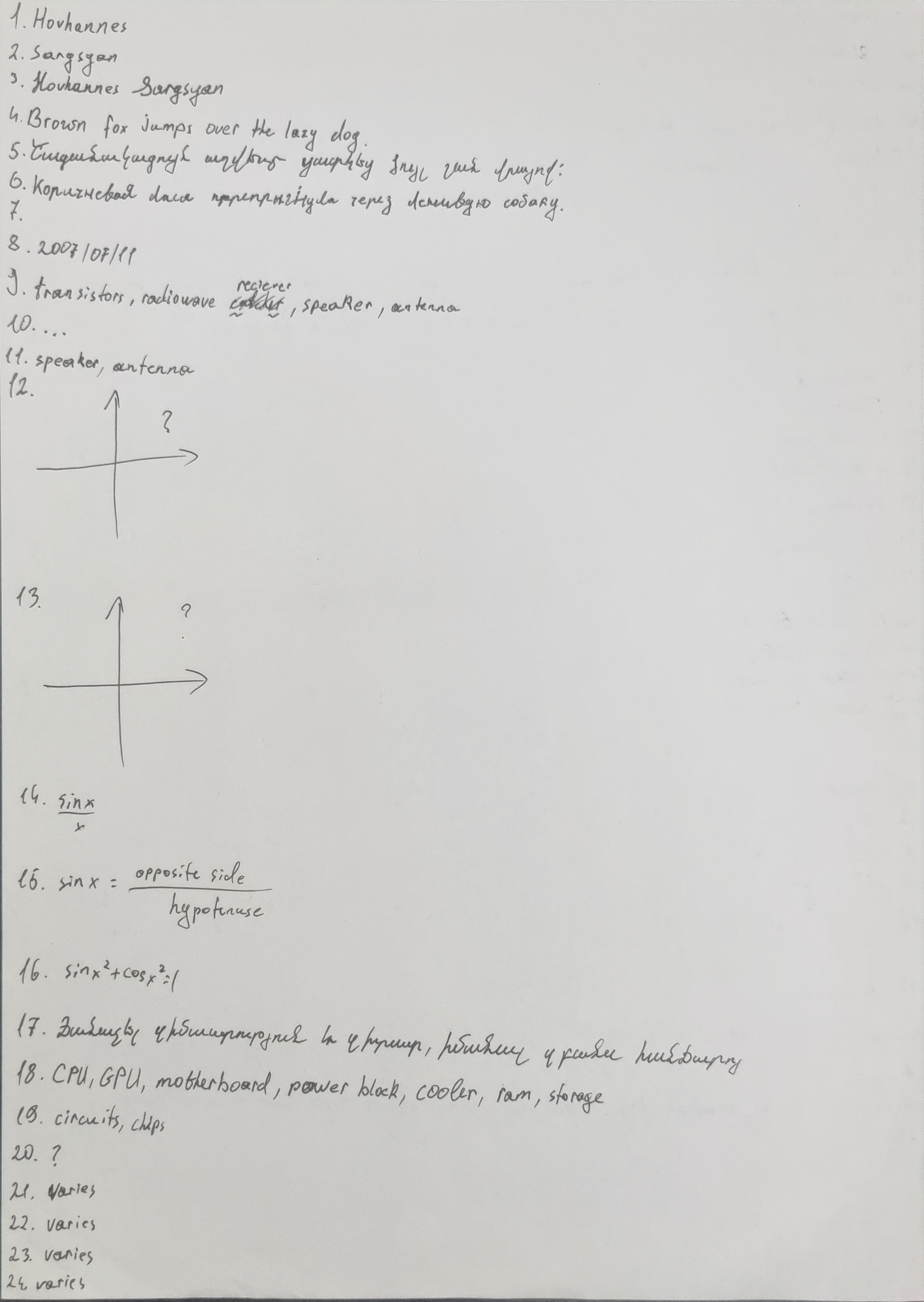
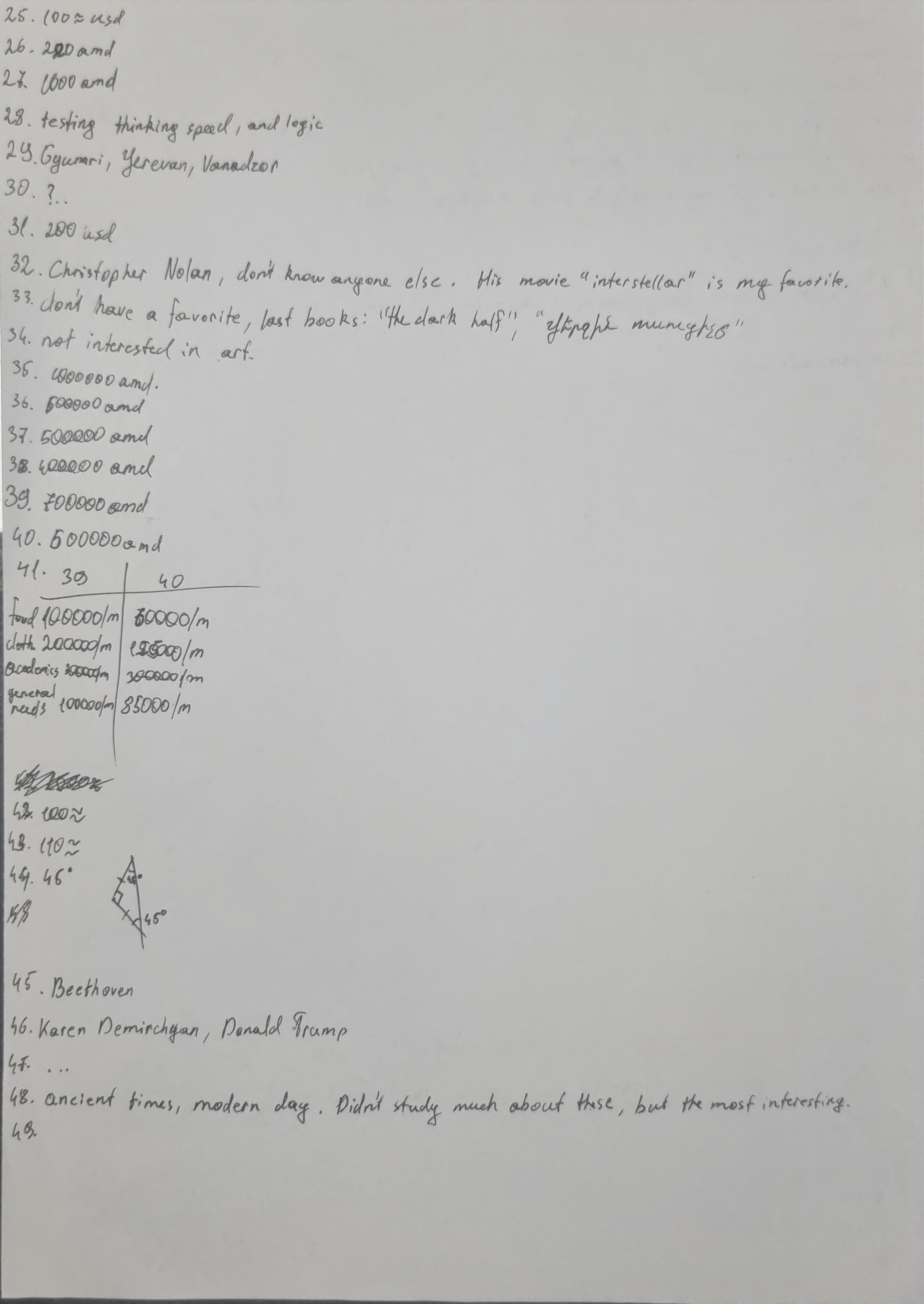
Intro Quiz
Screenshots of the quiz results.
Page 1
Page 2
GNU OS Setup
Configuration files and setup commands.
gnu_os_setup

1. Choose a GNU/Linux distribution such as Debian, Ubuntu, Fedora, or Linux Mint.

2. Prepare hardware: a computer, an internet connection, and a USB flash drive (at least 4 GB). Back up all important files.

3. Download the ISO image from the official website of the chosen distribution. Example: [https://www.debian.org/distrib/](https://www.debian.org/distrib/)

4. Verify the ISO checksum:
   sha256sum debian.iso
   Compare the result with the value on the website.

5. Create a bootable USB:
   Identify your USB device:
   lsblk
   Write the ISO:
   sudo dd if=debian.iso of=/dev/sdX bs=4M status=progress conv=fsync
   sync

6. Boot from the USB:
   Insert it into the target computer, reboot, enter the boot menu (F12, F10, or Esc), and select the USB device. Disable Secure Boot if needed.

7. Start installation:

   * Choose language, keyboard, and timezone.
   * Configure network.
   * Partition the disk:
     • EFI system partition: 512 MB FAT32 mounted at /boot/efi
     • Root partition (/): ext4, at least 20 GB
     • Swap partition: optional, similar to RAM size
     • Home partition (/home): optional
   * Create user and password.
   * Install base system and desktop environment.
   * Install GRUB bootloader to the main disk.

8. Finish installation:
   Remove the USB drive when prompted and reboot.

9. Update the system:
   Debian/Ubuntu:
   sudo apt update && sudo apt upgrade -y
   Fedora:
   sudo dnf upgrade --refresh

10. Install drivers and software:
    sudo apt install nvidia-driver firmware-linux vim git curl htop

11. Enable firewall:
    sudo apt install ufw
    sudo ufw enable

12. Optional GNU/Hurd installation:

    * Download Debian GNU/Hurd ISO.
    * Run in a virtual machine (recommended).
      Example:
      qemu-system-x86_64 -m 2048 -cdrom debian-hurd.iso -boot d -enable-kvm
    * Follow the same installer steps.

13. Reboot and use your GNU operating system.
Essays
Select an essay to read.
OS Architecture
An operating system is more than just software. It's the bridge between a computer's hardware and the programs we use every day. The way an Operating System is built, it's architecture, affects how stable, fast, and flexible it is.
There are several approaches to OS architecture. A monolithic Kernel keeps all core services together. This can make the system fast, but it can also be tricky to fix or update if something goes wrong. On the oth hand, a microkernel keeps only the essential parts in the Kernel and runs other services separately. This makes the OS more stable and easier to maintain, though it might run a little slower. Some systems even combine these ideas in hybrid architectures, trying to balance speed and flexibility.
An OS handles many important tasks: managing memory and processes, controlling hardware through device drivers, organizing files, and providing an interface for users. The best designs focus not only on performance but also on security and maintainability.
In the end, the architecture of an OS is a reflection of choices made by speed, reliability, and flexibility. Understanding these designs gives insight into computers behave the way they do and how engineers create systems that keep everything running smoothly.
Computer Architecture
Computer architecture is like the blueprint of a computer. It shows how all the parts - like the processor, memory, input-output devices - work together to make the computer run efficiently.
At the heart of a computer is the CPU, which handles calculations and coordinates tasks. The CPU works with memory, such as RAM for short-term storage and hard drives for long-term storage. These parts need to communicate quickly so programs can run smoothly.
Different computer designs organize these parts in different ways. For example, some computers store instructions and data together, while others keep them separate for faster performance. Processors also vary: some are designed to handle simple tasks very quickly, while others can manage more complex tasks at once.
Modern computers often have multiple processors working together and can perform many tasks at the same time understanding computer architecture helps us see why computers work the way they do and how engineers design them to be faster, smarter, and more reliable.
In the end, computer architecture is not just about technical details. It's about problem-solving. Each design represents choices made to balance speed, efficiency, and cost.
Life as a System: From Chaos to Engineering
Life is a very complex system. At first glance, when we think about our existence on Earth, and the world we live in, we may perceive it as chaotic. In reality, every single process, event, phenomenon is a consequence of something else that happened in the past, or is gouing to happen in the future.
The invention of the steam engine in the 18th century for example, led to the Industrial Revolution, and the evolution of the world we live in today. And just as our actions shape the future, our predictions of future define our actions. A perfect example of this is when a country anticipates a potential war, it begins preparing: strengthening alliances, adjusting diplomatic relations, purchasing weapons. These actions, in turn, influence industries, global politics, economies, and the history of the whole world,— even before the conflict occurs.
Just as in real life, in systems engineering too, everything is interconnected. A small, seemingly insignificant malfunction in an airplane can have catastrophic consequences. Systems engineering helps engineers understand the full picture of what they are dealing with, and therefore be able to tackle any problem that occur. Imagine someone taking a long trip on a motorcycle, and along the way, something in the motorcycle’s system breaks down. He looks at the components, but can’t even identify what caused the problem. In that case, does he really own the motorcycle?
So, in short, systems engineering is: being informed, and able to interact with the whole system an engineer is dealing with, not only one discipline. This means that to be a good systems engineer is be broadly educated, and able to understand connections across different fields, not only in one.
That’s why there are different social classes. Life itself shows us that systems are built on interconnections and roles. Just as society is structured with different functions and responsibilities, engineering systems also rely on balance and coordination. Not everyone can take the same role, and not every component can serve the same purpose. The key to stability, both in life and in engineering, is knowledge, and the will to understand how everything fits together. This is what systems engineering strives to achieve: the ability to see the whole picture and guide it toward success.
Rozettacode Project
Select a language to view the implementation.
main.cpp
#include
#include
using namespace std;

void equationSolver(double a, double b, double c) {
    if (a == 0) { // Linear case
        if (b == 0) {
            if (c == 0)
                cout << "Infinite solutions (0=0)" << endl;
            else
                cout << "No solution" << endl;
        } else {
            double x = -c / b;
            cout << "Linear equation: one solution x = " << x << endl;
        }
    } else { // Quadratic case
        double discriminant = b*b - 4*a*c;
        if (discriminant < 0) {
            cout << "Quadratic equation: no real solutions" << endl;
        } else if (discriminant == 0) {
            double x = -b / (2*a);
            cout << "Quadratic equation: one solution x = " << x << endl;
        } else {
            double x1 = (-b + sqrt(discriminant)) / (2*a);
            double x2 = (-b - sqrt(discriminant)) / (2*a);
            cout << "Quadratic equation: two solutions x1 = " << x1 << ", x2 = " << x2 << endl;
        }
    }
}

int main() {
    double a, b, c;
    cout << "Equation Solver (Linear and Quadratic)" << endl;
    cout << "Enter a: ";
    cin >> a;
    cout << "Enter b: ";
    cin >> b;
    cout << "Enter c: ";
    cin >> c;

    equationSolver(a, b, c);

    return 0;
}
}
script.lisp
script.lua
#!/usr/bin/env lua

print("Equation Solver (Linear and Quadratic)")

-- Read input
io.write("Enter a: ")
a = tonumber(io.read())

io.write("Enter b: ")
b = tonumber(io.read())

io.write("Enter c: ")
c = tonumber(io.read())

if a == 0 then
    -- Linear case: bx + c = 0
    if b == 0 then
        if c == 0 then
            print("Infinite solutions (0=0)")
        else
            print("No solution")
        end
    else
        x = -c / b
        print("Linear equation: one solution x = " .. x)
    end
else
    -- Quadratic case: ax^2 + bx + c = 0
    discriminant = b*b - 4*a*c
    if discriminant < 0 then
        print("Quadratic equation: no real solutions")
    elseif discriminant == 0 then
        x = -b / (2*a)
        print("Quadratic equation: one solution x = " .. x)
    else
        x1 = (-b + math.sqrt(discriminant)) / (2*a)
        x2 = (-b - math.sqrt(discriminant)) / (2*a)
        print("Quadratic equation: two solutions x1 = " .. x1 .. ", x2 = " .. x2)
    end
end
script.tcl
#!/usr/bin/env tclsh

puts "Equation Solver (Linear and Quadratic)"

# Read input
puts -nonewline "Enter a: "
flush stdout
gets stdin a

puts -nonewline "Enter b: "
flush stdout
gets stdin b

puts -nonewline "Enter c: "
flush stdout
gets stdin c

# Convert to numbers
set a [expr {$a*1.0}]
set b [expr {$b*1.0}]
set c [expr {$c*1.0}]

if {$a == 0} {
    # Linear case: bx + c = 0
    if {$b == 0} {
        if {$c == 0} {
            puts "Infinite solutions (0=0)"
        } else {
            puts "No solution"
        }
    } else {
        set x [expr {- $c / $b}]
        puts "Linear equation: one solution x = $x"
    }
} else {
    # Quadratic case: ax^2 + bx + c = 0
    set discriminant [expr {$b*$b - 4*$a*$c}]
    if {$discriminant < 0} {
        puts "Quadratic equation: no real solutions"
    } elseif {$discriminant == 0} {
        set x [expr { -$b / (2*$a) }]
        puts "Quadratic equation: one solution x = $x"
    } else {
        set x1 [expr {(-$b + sqrt($discriminant)) / (2*$a)}]
        set x2 [expr {(-$b - sqrt($discriminant)) / (2*$a)}]
        puts "Quadratic equation: two solutions x1 = $x1, x2 = $x2"
    }
}
script.py
import math

def equation_solver(a, b, c):
   if a == 0: #linear case: bx + c = 0
      if b == 0:
         if c == 0:
            return "Infinite solutions (0=0)"
         else:
            return "No solution"
      else:
         x = -c / b
         return f"Linear equation solution: One solution x = {x}"
   else: #quadratic case: ax^2 + bx + c = 0
      discriminant = b**2 - 4*a*c
      if discriminant < 0:
          return "Quadratic equation: No real solutions"
      elif discriminant == 0:
          x = -b / (2*a)
          return f"Quadratic equation: One solution: x = {x}"
      else:
        x1 = (-b + math.sqrt(discriminant)) / (2*a)
        x2 = (-b - math.sqrt(discriminant)) / (2*a)
        return f"Quadratic equation: Two solutions: x1 = {x1}, x2 = {x2}"

# --- main program ---

print("Equation solver (Linear and Quadratic)")
print("Solves: ax^2 + bx + c = 0 (quadratic) or bx + c = 0 (linear)")

# ask the user for input
a = float(input("Enter a: "))
b = float(input("Enter b: "))
c = float(input("Enter c: "))

# solve and print the result
print(equation_solver(a, b, c))"
Self Evaluation
Self Evaluation
1) Have an understanding of OS Architecture
2) Have an understanding of Computer Architecture
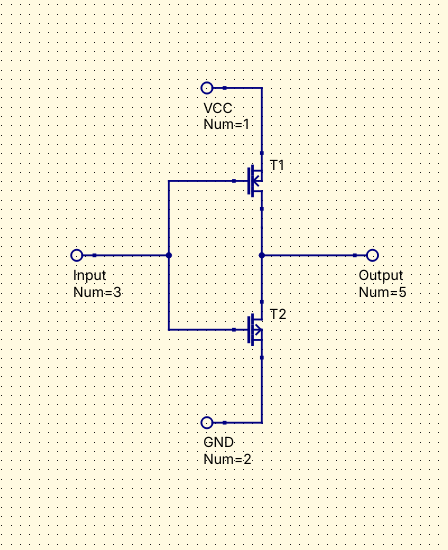
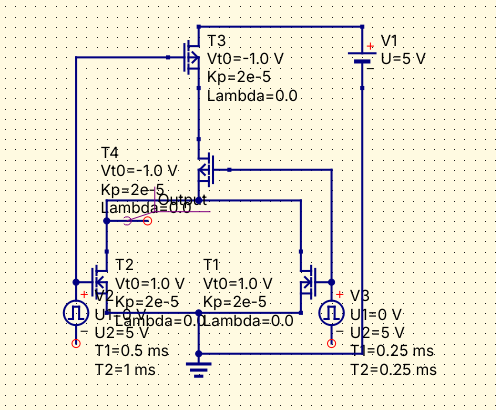
3) Have an understanding of Hardware
4) Theoretical assignments (Essays, Presentations, Reflections)
5) Programming Languages
Midterm Self Evaluation
Essays that I plan to rewrite: OS Architecture, Computer, Architecture
Essays that I plan to submit an artistic approach for: All of them combined in a single project
Demoscenes: Did not submit yet
Projects: Python Compiler
SSH Access
Keys or Access Logs.
Step 1 — Open Terminal

Use your terminal application (Linux, macOS, or Git Bash on Windows) to connect to the remote host.
Step 2 — Connect to Remote Host

ssh username@remote_host_address

Replace username with your account username and remote_host_address with the IP or hostname of the server.
Step 3 — Accept Host Key

The first time you connect, you may see:

The authenticity of host 'remote_host_address (192.168.x.x)' can't be established.
ECDSA key fingerprint is SHA256:xxxxxxxxxxxxxxxxxxxx.
Are you sure you want to continue connecting (yes/no)? yes

Step 4 — Enter Password

After accepting the key, enter your password for the account:

password: ********

Step 5 — Verify Connection

Once connected, you can verify the remote machine details:

uname -a
whoami
pwd
Demoscenes
Graphical and algorithmic demonstrations.
Demoscene Python
import sys
import math
import time

W = 80
H = 40

def main():
    t = 0.0
    sys.stdout.write("\033[2J")

    try:
        while True:
            buffer = []
            sys.stdout.write("\033[H")

            shift_x = math.sin(t * 0.5) * 20.0
            shift_y = math.cos(t * 0.3) * 10.0

            for y in range(H):
                row = ""
                dy = (y - H / 2) * 2.0 + shift_y

                for x in range(W):
                    dx = (x - W / 2) + shift_x

                    distance = math.sqrt(dx*dx + dy*dy)
                    angle = math.atan2(dy, dx)

                    depth = 30.0 / (distance + 0.1)

                    u = int(angle * 4.0 / 3.1415 + t * 0.5)
                    v = int(depth * 10.0 - t * 2.0)

                    shade = int(distance / 2.0)
                    if shade > 5: shade = 5
                    if shade < 0: shade = 0

                    col_idx = (u ^ v) & 1

                    if col_idx:
                        color = 232 + (shade * 4)
                    else:
                        color = 16 + (shade * 36)
                        if color > 231: color = 231

                    row += f"\033[48;5;{color}m "

                row += "\033[0m"
                buffer.append(row)

            sys.stdout.write("\n".join(buffer))
            t += 0.05
            time.sleep(0.01)

    except KeyboardInterrupt:
        sys.stdout.write("\033[0m\033[2J")

if __name__ == "__main__":
    main()
Demoscene JS
const WIDTH = 80;
const HEIGHT = 40;
let t = 0.0;

process.stdout.write("\x1b[2J");

function main() {
    setInterval(() => {
        let buffer = "\x1b[H";

        const b1x = WIDTH/2 + Math.cos(t) * 20;
        const b1y = HEIGHT/2 + Math.sin(t) * 10;

        const b2x = WIDTH/2 + Math.sin(t * 1.5) * 25;
        const b2y = HEIGHT/2 + Math.cos(t * 2.5) * 12;

        const b3x = WIDTH/2 + Math.sin(t * 0.8) * 15;
        const b3y = HEIGHT/2 + Math.sin(t * 0.8) * 15;

        for (let y = 0; y < HEIGHT; y++) {
            for (let x = 0; x < WIDTH; x++) {
                const d1 = Math.hypot((x - b1x) * 0.5, y - b1y);
                const d2 = Math.hypot((x - b2x) * 0.5, y - b2y);
                const d3 = Math.hypot((x - b3x) * 0.5, y - b3y);

                const sum = (15 / d1) + (12 / d2) + (10 / d3);

                let color = 232;

                if (sum > 2.8) color = 196;
                else if (sum > 1.8) color = 208;
                else if (sum > 1.2) color = 220;
                else if (sum > 0.8) color = 240;
                else if (sum > 0.5) color = 235;

                buffer += `\x1b[48;5;${color}m `;
            }
            buffer += "\x1b[0m\n";
        }

        process.stdout.write(buffer);
        t += 0.08;

    }, 30);
}

main();
Demoscene c++
#include
#include
#include
#include
#include

int main() {
    const int W = 80;
    const int H = 40;
    double t = 0.0;

    std::cout << "\033[2J";

    while (true) {
        std::string buffer = "\033[H";

        double zoom = 1.0 + std::sin(t * 0.5) * 0.8;
        double angle = t * 0.4;

        double cosA = std::cos(angle) * zoom;
        double sinA = std::sin(angle) * zoom;

        for (int y = 0; y < H; ++y) {
            for (int x = 0; x < W; ++x) {
                double dx = (x - W / 2.0);
                double dy = (y - H / 2.0) * 2.0;

                double u = dx * cosA - dy * sinA + t * 30.0;
                double v = dx * sinA + dy * cosA;

                int checker = (static_cast(std::abs(u) * 0.1) ^ static_cast(std::abs(v) * 0.1)) & 1;

                int color;
                if (checker) {
                    double wave = std::sin(u * 0.05 + t) * 2.0;
                    color = 160 + static_cast(wave);
                } else {
                    double wave = std::cos(v * 0.05 - t) * 2.0;
                    color = 53 + static_cast(wave);
                }

                buffer += "\033[48;5;" + std::to_string(color) + "m ";
            }
            buffer += "\033[0m\n";
        }

        std::cout << buffer;
        std::cout.flush();

        t += 0.05;
        std::this_thread::sleep_for(std::chrono::milliseconds(30));
    }

    return 0;
}
Demoscene lisp
(defconstant +width+ 80)
(defconstant +height+ 40)

(defun main ()
  (format t "~c[2J" #\ESC)
  (loop for t-val from 0.0 by 0.1 do
    (format t "~c[H" #\ESC)

    (let ((cx (+ 40.0 (* 15.0 (sin (* t-val 0.5)))))
          (cy (+ 20.0 (* 8.0 (cos (* t-val 0.7))))))

      (loop for y from 0 below +height+ do
        (loop for x from 0 below +width+ do
          (let* ((dx (- x cx))
                 (dy (* 2.2 (- y cy)))
                 (dist (sqrt (+ (* dx dx) (* dy dy))))
                 (angle (atan dy (+ dx 0.001)))

                 (raw-val (sin (+ (* angle 5.0) (- dist (* t-val 2.0)))))

                 (idx (floor (+ 4.0 (* raw-val 4.0))))
                 (color 0))

            (cond
              ((= idx 0) (setf color 53))
              ((= idx 1) (setf color 54))
              ((= idx 2) (setf color 55))
              ((= idx 3) (setf color 56))
              ((= idx 4) (setf color 57))
              ((= idx 5) (setf color 93))
              ((= idx 6) (setf color 99))
              ((= idx 7) (setf color 129))
              (t (setf color 201)))

            (format t "~c[48;5;~dm " #\ESC color)))
        (format t "~c[0m~%" #\ESC)))

    (force-output)
    (sleep 0.03)))

(main)
Demoscene lua
local w = 80
local h = 40
local t = 0.0

io.write("\27[2J")

while true do
    io.write("\27[H")
    local buffer = {}

    local cx = -0.8 + 0.156 * math.sin(t)
    local cy = 0.156 * math.cos(t)

    for y = 0, h - 1 do
        for x = 0, w - 1 do
            local zx = 1.5 * (x - w / 2) / (0.5 * w)
            local zy = (y - h / 2) / (0.5 * h)

            local i = 0
            local max_iter = 30

            while (zx * zx + zy * zy < 4.0 and i < max_iter) do
                local xtemp = zx * zx - zy * zy
                zy = 2.0 * zx * zy + cy
                zx = xtemp + cx
                i = i + 1
            end

            local color = 16
            if i > 25 then color = 232
            elseif i > 20 then color = 22
            elseif i > 15 then color = 28
            elseif i > 10 then color = 34
            elseif i > 5 then color = 40
            elseif i > 2 then color = 46
            else color = 82 end

            table.insert(buffer, string.format("\27[48;5;%dm ", color))
        end
        table.insert(buffer, "\27[0m\n")
    end

    io.write(table.concat(buffer))

    t = t + 0.05

    local start = os.clock()
    while os.clock() - start < 0.03 do end
end
Demoscene tcl
#!/usr/bin/env tclsh

set w 80
set h 40
set t 0.0

puts "\033\[2J"

while {1} {
    puts -nonewline "\033\[H"
    set buffer ""

    set x1 [expr {40.0 + 20.0 * sin($t)}]
    set y1 [expr {20.0 + 10.0 * cos($t * 1.3)}]

    set x2 [expr {40.0 + 25.0 * sin($t * 0.7)}]
    set y2 [expr {20.0 + 12.0 * sin($t * 1.6)}]

    for {set y 0} {$y < $h} {incr y} {
        for {set x 0} {$x < $w} {incr x} {
            set dx1 [expr {$x - $x1}]
            set dy1 [expr {($y - $y1) * 2.0}]
            set d1 [expr {sqrt($dx1*$dx1 + $dy1*$dy1)}]

            set dx2 [expr {$x - $x2}]
            set dy2 [expr {($y - $y2) * 2.0}]
            set d2 [expr {sqrt($dx2*$dx2 + $dy2*$dy2)}]

            set val [expr {sin($d1 / 4.0 - $t * 2.0) + sin($d2 / 5.0 + $t)}]

            set color 16
            if {$val > 1.5} { set color 51 } \
            elseif {$val > 1.0} { set color 45 } \
            elseif {$val > 0.5} { set color 39 } \
            elseif {$val > 0.0} { set color 27 } \
            elseif {$val > -0.5} { set color 21 } \
            elseif {$val > -1.0} { set color 19 } \
            elseif {$val > -1.5} { set color 18 }

            append buffer "\033\[48;5;${color}m "
        }
        append buffer "\033\[0m\n"
    }

    puts -nonewline $buffer
    flush stdout

    set t [expr {$t + 0.1}]
    after 30
}
Game of Life
Cellular automaton implementation.
#include
#include
#include
#include

// Platform-specific includes for unbuffered keyboard input
#ifdef _WIN32
    #include  // For _getch()
#else
    #include  // For termios, tcgetattr, tcsetattr
    #include   // For STDIN_FILENO, read
#endif

/**
 * @class GameOfLife
 * @brief Manages the state and rules for Conway's Game of Life.
 * (This class remains unchanged from the previous version)
 */
class GameOfLife {
private:
    int width;
    int height;
    std::vector> grid;

    int countLiveNeighbors(int x, int y) {
        int count = 0;
        for (int i = -1; i <= 1; i++) {
            for (int j = -1; j <= 1; j++) {
                if (i == 0 && j == 0) continue;
                int neighbor_x = x + i;
                int neighbor_y = y + j;
                if (neighbor_x >= 0 && neighbor_x < height && neighbor_y >= 0 && neighbor_y < width) {
                    if (grid[neighbor_x][neighbor_y]) {
                        count++;
                    }
                }
            }
        }
        return count;
    }

public:
    GameOfLife(int w, int h) : width(w), height(h) {
        grid.assign(height, std::vector(width, false));
    }

    void setCell(int x, int y, bool isAlive) {
        if (x >= 0 && x < height && y >= 0 && y < width) {
            grid[x][y] = isAlive;
        }
    }

    // Toggles the state of a cell and returns its new state
    bool toggleCell(int x, int y) {
        if (x >= 0 && x < height && y >= 0 && y < width) {
            grid[x][y] = !grid[x][y];
            return grid[x][y];
        }
        return false;
    }

    // A special print function for the setup phase that shows a cursor
    void printGridWithCursor(int cursorX, int cursorY) {
        #ifdef _WIN32
            system("cls");
        #else
            system("clear");
        #endif

        for (int i = 0; i < height; i++) {
            for (int j = 0; j < width; j++) {
                if (i == cursorY && j == cursorX) {
                    // Draw the cell under the cursor with brackets
                    std::cout << (grid[i][j] ? "[■]" : "[.]");
                } else {
                    // Use two characters for consistent spacing
                    std::cout << (grid[i][j] ? " ■ " : " . ");
                }
            }
            std::cout << std::endl;
        }
    }

    void printGrid() {
        #ifdef _WIN32
            system("cls");
        #else
            system("clear");
        #endif
        for (int i = 0; i < height; i++) {
            for (int j = 0; j < width; j++) {
                std::cout << (grid[i][j] ? "■ " : ". ");
            }
            std::cout << std::endl;
        }
    }

    void nextGeneration() {
        std::vector> nextGrid = grid;
        for (int i = 0; i < height; i++) {
            for (int j = 0; j < width; j++) {
                int liveNeighbors = countLiveNeighbors(i, j);
                if (grid[i][j]) {
                    if (liveNeighbors < 2 || liveNeighbors > 3) nextGrid[i][j] = false;
                } else {
                    if (liveNeighbors == 3) nextGrid[i][j] = true;
                }
            }
        }
        grid = nextGrid;
    }

    void run(int generations, int delay_ms = 100) {
        for (int i = 0; i < generations; ++i) {
            printGrid();
            std::cout << "Generation: " << i + 1 << " / " << generations << std::endl;
            nextGeneration();
            std::this_thread::sleep_for(std::chrono::milliseconds(delay_ms));
        }
    }
};

// --- Platform-specific character input function ---
char getChar() {
#ifdef _WIN32
    return _getch();
#else
    char buf = 0;
    struct termios old = {0};
    fflush(stdout);
    if (tcgetattr(STDIN_FILENO, &old) < 0) perror("tcsetattr()");
    old.c_lflag &= ~ICANON;
    old.c_lflag &= ~ECHO;
    old.c_cc[VMIN] = 1;
    old.c_cc[VTIME] = 0;
    if (tcsetattr(STDIN_FILENO, TCSANOW, &old) < 0) perror("tcsetattr ICANON");
    if (read(STDIN_FILENO, &buf, 1) < 0) perror("read()");
    old.c_lflag |= ICANON;
    old.c_lflag |= ECHO;
    if (tcsetattr(STDIN_FILENO, TCSADRAIN, &old) < 0) perror("tcsetattr ~ICANON");
    return buf;
#endif
}


// --- New Interactive Setup Function ---
void interactiveSetup(GameOfLife& game, int width, int height) {
    int cursorX = width / 2;
    int cursorY = height / 2;
    char input;

    while (true) {
        game.printGridWithCursor(cursorX, cursorY);
        std::cout << "\n--- INTERACTIVE SETUP ---\n";
        std::cout << "Use Arrow Keys or WASD to move the cursor.\n";
        std::cout << "Press [Spacebar] to toggle a cell's state (alive/dead).\n";
        std::cout << "Press [Enter] to start the simulation.\n";

        input = getChar();

        // Arrow keys can send multiple characters, this handles them
#ifdef _WIN32
        // On Windows, special keys return 224 followed by the key code
        if (input == (char)224) {
            input = getChar(); // Get the actual key code
            switch (input) {
                case 72: cursorY = std::max(0, cursorY - 1); break; // Up
                case 80: cursorY = std::min(height - 1, cursorY + 1); break; // Down
                case 75: cursorX = std::max(0, cursorX - 1); break; // Left
                case 77: cursorX = std::min(width - 1, cursorX + 1); break; // Right
            }
        }
#else
        // On Linux, arrow keys are escape sequences like '\x1b[A'
        if (input == '\x1b') {
            getChar(); // Skip the '['
            switch (getChar()) {
                case 'A': cursorY = std::max(0, cursorY - 1); break; // Up
                case 'B': cursorY = std::min(height - 1, cursorY + 1); break; // Down
                case 'C': cursorX = std::min(width - 1, cursorX + 1); break; // Right
                case 'D': cursorX = std::max(0, cursorX - 1); break; // Left
            }
        }
#endif

        switch (input) {
            case 'w': case 'W':
                cursorY = std::max(0, cursorY - 1);
                break;
            case 's': case 'S':
                cursorY = std::min(height - 1, cursorY + 1);
                break;
            case 'a': case 'A':
                cursorX = std::max(0, cursorX - 1);
                break;
            case 'd': case 'D':
                cursorX = std::min(width - 1, cursorX + 1);
                break;
            case ' ': // Spacebar
                game.toggleCell(cursorY, cursorX);
                break;
            case 13: // Enter key
                return; // Exit setup
            case 10: // Enter key on some systems
                return; // Exit setup
        }
    }
}

int main() {
    // Define grid dimensions
    const int width = 30;
    const int height = 20;

    // Create a Game of Life object
    GameOfLife game(width, height);

    // --- Start the new interactive setup ---
    interactiveSetup(game, width, height);

    // --- Start the Simulation ---
    std::cout << "\nSetup complete. Starting simulation...\n";
    std::this_thread::sleep_for(std::chrono::seconds(2));

    // Run the simulation
    game.run(300, 80);

    return 0;
}